Friday, 12 April 2013

chapter 6: Web Application


 Web Application

For this week session is a very good we week that gives me more knowledge in the Web Application. This week also gives me to know what is Web and what is Internet.

What is the difference between Internet and Web?
 Internet: is the largest network in the world that connects people/organization all over the world. It is also the global system interconnected networks that uses the standard internet protocol to serve billions of user.
Web: are contains hypertext links, or highlighted keywords and images that lead to related information and it a collection of electronic documents.

Web applications defined:
* A web application or Web Apps
      - Internet Explorer
      - Netscape
      - Mozilla Firefox
      - Safari
      - Opera 
Web Page
        - Web document.
        - HTML (Hyper Text Markup Language)
Types of Web: 
         1.  Static web
           - Is a "read-only web"
                + allows people to search for information and read it.
                + Example: web 1.0

         2.  dynamic web
                + Web interractions between people, software
                + Example: web 2.0 and 3.0

GENERATION OF THE WEB: 
  1. 1st generation: Web 1.0 
   Examples: Information Website, Educational Web, Company Website.
  
   2. 2nd generation: Web 2.0
   3. 3rd generation: Web 3.0
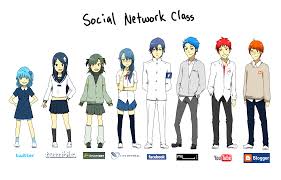
These are Categories of Web 2.0 
1. Online Social Network.
2. Mashups and aggregators 

For the information technologies and applications of Web 2.0 have: 
* XML and AJAX are examples of Programming Language used in Web Applications.
* Programming Language: is a language for a programmer used to communicate with a computer.

TYPES OF PL

  • Divided into 2 types
  1. Low-Level Language such as Machine-dependent language (- Machine Language 1st generation PL and Assembly Language 2nd generation PL)
  2. High-Level Language: more user-friendly and there are three generations of HLL (3rd generation PL, 4th generation PL and 5th generation PL).


What is Google apps?
 Google application is a series of applications from Google.
There is many types of Google applications:
  1. Google Applications Technology
  • Messaging 
  • Calendaring
  • Documents
  • Video 
  • Sites
  • Talk
  • Maps


For the last part of Web Application lesson there are have many main point that related to the Google Application. These are some main point which I have learned from this lesson.

The first thing that we have to know about the Google Application. We should know what is Google Application? 

Google Applications is a service from Google providing independently customizable versions of several Google products under a custom domain name

For Example: Web applications including Gmail, Google Groups, Google Celandar, Talk, Docs and Sites. 

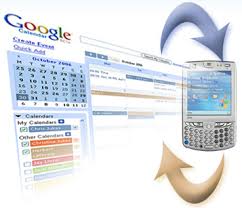
* Google Calendar: (http://calendar.google.com) keeps track of your events. You can easily add new calendar items and access them from anywhere, including your BlackBerry or iPhone.
Example: 
* Google Document: use to create, edit, and store documents, spreadsheets, an presentations, online with Google Documents (http://docs.goodle.com)
Google Doc tutorial: 
https://sites.google.com/a/googleapps.com/google-apps-learning-center/docs

* Gmail: (www.gmail.com) is Google's solution to e-mail. It features a simple interface and a lot of cool innovations, such as conversations and labels.
Interactive tour of Gmail: 

Thursday, 11 April 2013

Chapter 5: INTERNET

INTERNET 

     This lesson is a new lesson for me which I have learnt this trimester. Our lecturer Miss. Nisha guided us to know the importance of  the Internet and World Wilde Web which we use every day in our daily studies. Moreover, she taught us about the Web, Link and so on. This lesson look a bit long, but it never mind for students because we need to know about it and in help us in many way. Now day technology makes the world become smaller and smaller because every things are in the Internet. For example if we want to know some information about Albukhary International University they just type AIU web site (www.aiu.edu.my) they will see every information about AIU. Internet was found at first in 1969 by the named is ARPANET and it become to  they change from ARPANET to  INTERNET in 1980 until now day.

What is the Internet?
Internet is the global system interconnected networks that uses the standard internet protocol to serve billions of user. It is the largest network in the world that connects people/organization all over the world.

The usage of the Internet

We can use Internet in many ways that we want to use it and it makes users easy to achieve their goals. People use the technology of  Internet to:
  1. Find general information/ Access Information.
  2. Send (upload) or receive (download) files between computers.
  3. Share resources
  4. Correspond/meet with people 
  5. Shop for product and services.
These are some Services on the Internet that it provided to the users or the systems:
  •  Communication (Electronic Mail): It allowed messages to be exchanged from computer to computer. Email program used to create, send receive, forward, store, print and delete email. 

Examples: 
- Yahoo
- Gmail
- MSN
- Hotmail


  • World Wide Web
  •  
What is Web?
A collection of linked Web pages that has a common theme or focus is called a Web site. Website is a collection of the documents (web page)


  • Protocol: is the transfer protocol is the set of rules/ software that the computers use to move files from one computer to another on the Internet. The most common transfer protocol used on the Internet is the Hypertext Transfer Protocol (HIIP) and FTP
Example: Web browser works by using  a protocol called Hypertext Transfer Protocol (HTTP) to request a specially encoded text document from server.

  • Chat Room: channel/medium/location on Internet the allow people to chat with each other.
Examples:
 (1) Real chat. 
(2) Yahoo Message Chat Room. 
(3) AOL Chat Room.

  • Instant Messaging:
  • IR

Internet Service VoIP

  • Voice Over Internet Protocol or "Internet Telephony"
  • Use internet to make phone call.
  • allow users to speak to other user over internet
  • Examples:
-Skype
-Yahoo Voice
-Windows Live call
-Net Meeting

All of these information or this knowledge we use them everyday in our life. By follow the technologies are increase from day to days......

Sunday, 7 April 2013

Chapter 4: DATABASE

DATABASE 
This lesson is a very interesting for me. Because in it is important for me to get that knowledge to to apply in my studies. Moreover, it help in my studies and makes me know more about the use of technology in our daily life. The technology now increase very fast and it guide us easily to know the world. It also makes the world smaller and smaller.

Do you know what is database?

Database: is a collection of interrelated data stored together with controlled redundancy to serve one or more applications in an optimal way. One more thing it has three function that we us to store, organize and control DATA.


DATABASE COMPONENTS
  • Data item: it is defined as an distinct pieces of information and is explained in the previus section.
  • Relationships: I represents a correspondence between various data elements.
  • Constraints: These are the predicates that define correct database states.
  • Schema: It describes the organisation of data relationships within the database.
This is the Database component


Other than that, I have learnt about Database Management Systems
The DBMS performs the following five primary functions:
  1. Define, create and organize a database 
  2. Input data
  3. Process data
  4. Maintain data integrity and security
  5. Query database

These are Examples of DBMS
  • Microsoft Access
  • Oracle
  • IBM DB2
  • SQL Server
  • MySQL
DATABASE SYSTEM
The DBMS software together with the Database is called a database system. It can be defined as an organization of components that define and regulate the collection, storage, management and use of data in a database. It is a system whose overall purpose is to record and maintain information.

Advantages of Database Systems
  1. Controlled redundancy
  2. Data consistency
  3. Sharing of data
  4. Improved data integrity
  5. Improved security
  6. Data access is efficient

TYPES OF DATABASE MODELS
They are four types of database models:
  • Hierarchical database
  • Network database
  • Relational database
  • Object-relational database
Hierarchical database
  • The hierarchical data model organizes data in a tree structure.
  • There is a hierarchy of parent and child data segments.
  • This structure implies that a record can have repeating information, generally in the child data segments.
  • Hierarchical DBMSs were popular from the late 1960s. with the introduction of IBM's Information Management System (IMS) DBMS, through the 1970s.
Network database
  • Resembles hierarchical model.
  • Difference child can have multiple parents.
  • Some data were more naturally modeled with more than one parent per child.
  • The network model permitted the modeling of many to many relationships in data.
We have also learn about the Relational Database which guide us to know more about the database.  It related to the fields that can be use in a number of way (and can be of variable length), provided that they are linked in tables. It is developed based on a database model that provides for logical connections among files (known as tables) by including identifying data from one table in another table. It also tables comprise the fundamental building blocks of any database. Relation, basically a tables with rows and columns.

Database terminology

   Term                  Description
  • Field :   A specific piece or data such as a first name, last name, city, state, subject or      birth date.
  • Record: A group of related fields that describes a person, place, thing or transaction such as customer, student, location, product, or sale.
  • Key field:  A field that contains unique information for each record, such as student ID for a student.
  • Table : A collection of records for a single subject such as Students, Products, of Sales.
  • Relational database: Multiple tables that are linked together to address a business process such as managing timetable, courses, and students.
  • Objects: The parts of Access database that help you view, edit, manage, and analyze the data: tables, queries, forms, reports, macros, and modules.
EXAMPLE: 

DATABASE has many Types of language which we need to use them everyday in our technology that we need for many use. First type is DDL (Data Definition Language). For second type is DML (Data Manipulation Language) and the third is DCL (Data Control Language). All of them have differences function for create language styles.